Why teams love Payroll Reports
Payroll with Overtime Calculations
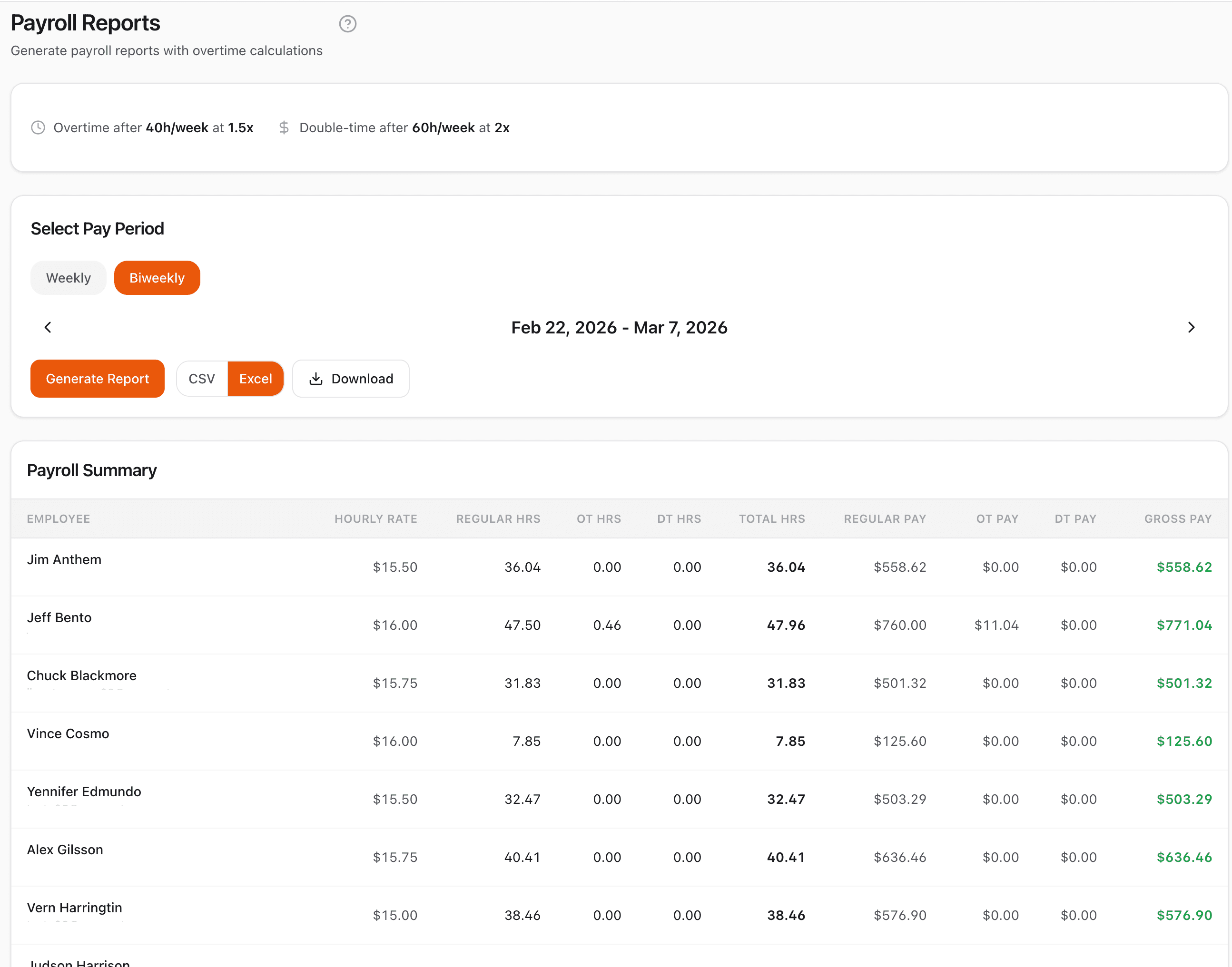
The Payroll page automatically splits hours into regular, overtime, and double-time based on your company settings, and calculates pay for each employee.
Activity Reports
The Reports page generates detail or summary reports with labor costs. Filter by employee or project, choose a pay period or custom date range, and compare periods side by side.
CSV & Excel Export
Both Payroll and Activity Reports export in CSV or Excel format, compatible with Gusto, QuickBooks, ADP, Paychex, and virtually any payroll system.
Pay Period & Custom Date Ranges
Payroll reports use weekly or biweekly pay periods. Activity reports offer pre-calculated pay periods plus a custom date range option with start and end date pickers.
How it works
CrewPunch gives you two report tools. The Payroll page calculates regular, overtime, and double-time hours and pay for each employee — select a weekly or biweekly pay period, and get a complete payroll summary with gross pay. The Reports page lets you generate detailed activity reports or summaries with custom date ranges, filter by employee or project, and compare periods side by side. Both export as CSV or Excel for Gusto, QuickBooks, ADP, or any payroll provider.
Frequently asked questions
What is the difference between the Payroll page and the Reports page?
The Payroll page calculates regular, overtime, and double-time hours and pay for each employee based on a weekly or biweekly pay period. The Reports page generates activity reports in detail or summary format, with filters for employee and project, custom date ranges, and labor cost columns.
What export formats are supported?
Both Payroll and Activity Reports can be exported as CSV or Excel (XLSX). CSV files are compatible with virtually any payroll system including Gusto, QuickBooks, ADP, and Paychex.
Can I compare hours between two pay periods?
Yes. On the Reports page, enable period comparison when using the summary report type. Select a current and previous pay period to see side-by-side hours with the change (delta) and percentage difference for each employee.
Can I filter reports by project?
Yes, on the Business plan. The Reports page lets you filter by specific employees and projects. The Payroll page shows all employees for the selected pay period.
Do reports include labor costs?
Yes. Activity reports include hourly rate and labor cost columns when employee hourly rates are configured. The Payroll page shows regular pay, overtime pay, double-time pay, and gross pay for each employee.
Related features
Explore more ways CrewPunch helps your team.
Overtime Alerts
Get notified before employees hit overtime. Set custom overtime thresholds, track weekly hours in real-time, and control labor costs proactively.
Break Compliance
State-specific meal and rest break compliance built-in. Automatic break tracking, employee attestations, alerts for missed breaks, and audit trails.
One-Tap Time Clock
Simple employee time clock app that works on any device. One-tap clock in/out with GPS verification. No app downloads required.
Ready to try Payroll Reports?
The easiest way to track hours for your hourly team. Try it free for 14 days.
Start Your Free Trial14-day free trial • No credit card required • Cancel anytime