Why teams love Break Compliance
Automatic Break Tracking
CrewPunch tracks meal and rest breaks automatically based on shift length, following the break laws for the state configured in your company settings. If your company is headquartered in a state without break requirements but has remote employees in states that do, you can assign a different break compliance state per employee to ensure everyone is covered correctly.
Employee Attestations
Employees confirm their breaks were taken with digital attestations. Documentation is stored automatically for compliance.
Missed Break Alerts
Get notified immediately when an employee misses a required break, so you can address it before it becomes a violation.
Audit Trail
Complete, timestamped records of every break taken, missed, or waived. Ready for labor board inspections at any time.
How it works
CrewPunch handles the complexity of break compliance so you don't have to. Automatic tracking of meal and rest breaks, employee attestations confirming breaks were taken, real-time alerts when breaks are missed, and complete audit trails for inspections. Supports state-specific break requirements including California, Washington, and more.
Frequently asked questions
How do I enable break compliance tracking?
Go to Settings and enable break compliance tracking. Select your state from the dropdown — CrewPunch will automatically apply that state's meal and rest break rules to all shifts. If you have employees in different states than the company's headquarters, select the appropriate break compliance rules for those employees on the Employee Directory page. If your company is in California but you also have employees in Nevada and Arizona, no problem — CrewPunch is flexible enough to handle it.
Which states are supported?
CrewPunch supports break compliance rules for over 20 states including California, Washington, Oregon, New York, Colorado, Illinois, and more. Each state has its own meal and rest break thresholds based on shift length. Learn more from the Department of Labor.
What is the difference between meal breaks and rest breaks?
Meal breaks are unpaid — employees enter the minutes taken and that time is deducted from their hours. Rest breaks are paid — employees stay on the clock and confirm they received their rest breaks via an attestation checkbox when clocking out.
What happens when an employee misses a required break?
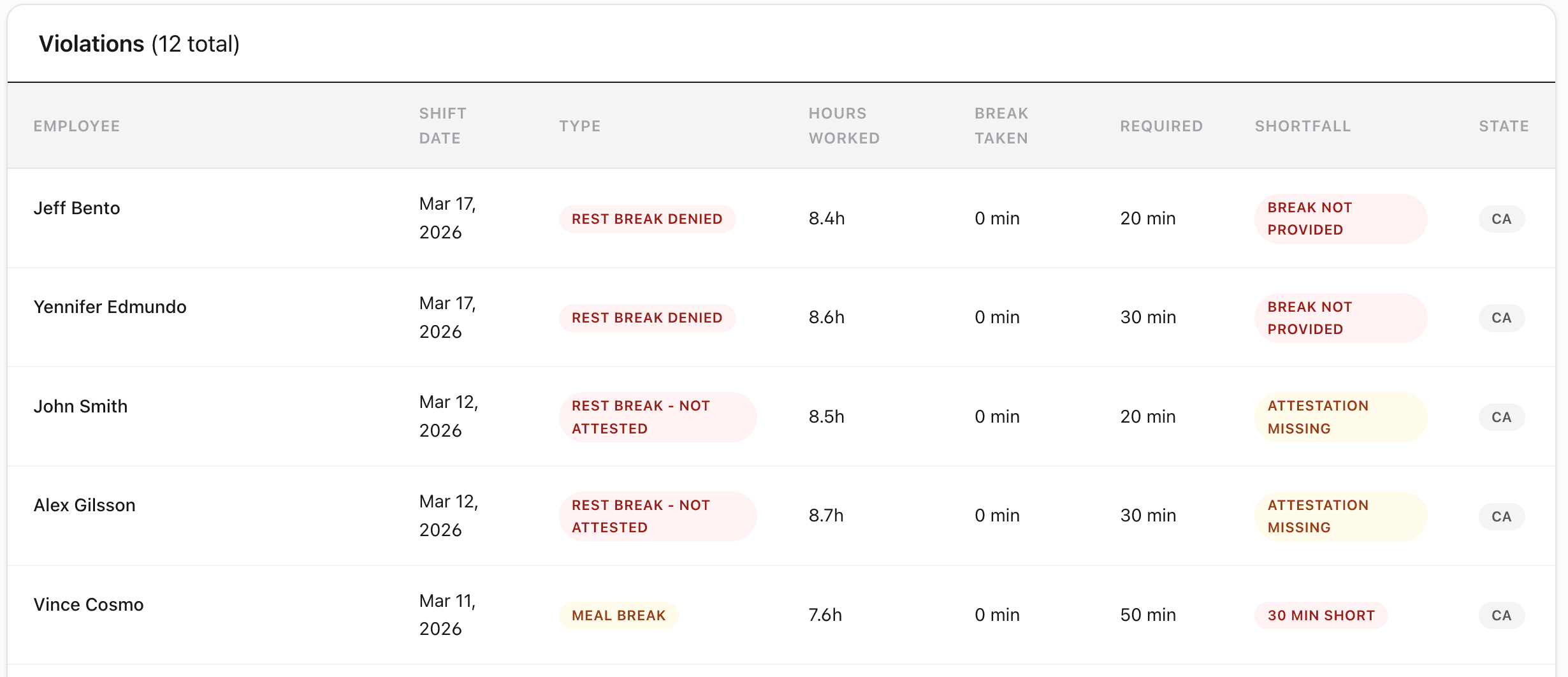
CrewPunch creates a violation alert on the Break Compliance Report. The report shows the violation type (meal break, rest break not attested, or rest break denied), hours worked, break taken, required break minutes, and the shortfall.
What is the rest break attestation?
When an employee clocks out of a shift that requires rest breaks, they are asked to confirm they received their paid rest breaks. If they check the box, the rest break is considered taken. If they deny it or don't respond, a violation is recorded.
Related features
Explore more ways CrewPunch helps your team.
Payroll Reports
Two powerful report tools: Payroll Reports with automatic overtime and pay calculations, and Activity Reports with detail/summary views, custom date ranges, and employee or project filters. Export as CSV or Excel.
Overtime Alerts
Get notified before employees hit overtime. Set custom overtime thresholds, track weekly hours in real-time, and control labor costs proactively.
Team Management
Four role levels — owner, admin, manager, and employee. Assign managers to oversee their direct reports. Work site assignments keep teams organized.
Ready to try Break Compliance?
The easiest way to track hours for your hourly team. Try it free for 14 days.
Start Your Free Trial14-day free trial • No credit card required • Cancel anytime