Why teams love Time Off Tracking
Easy Requests
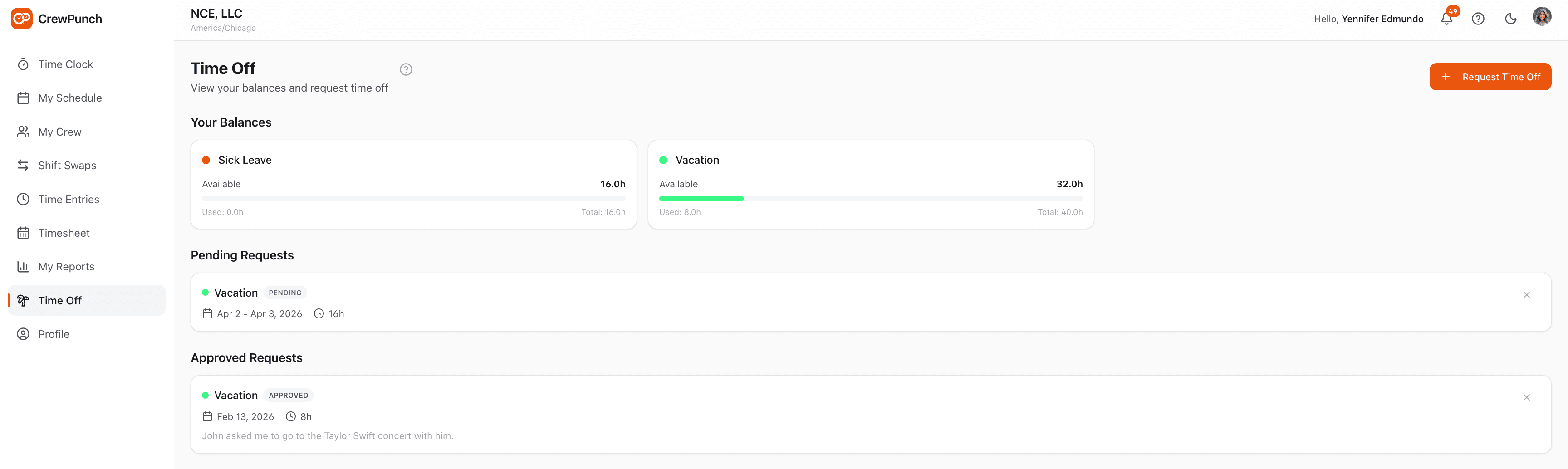
Employees select a PTO type, pick their dates, and hours are auto-calculated. Add optional notes and submit — no forms or email chains needed.
One-Tap Approvals
Admins and managers approve or deny PTO requests with a single click. Employees are notified instantly via in-app notification and email.
Balance Tracking
PTO balances update automatically when requests are approved. Employees see their available, used, and accrued hours at a glance.
Custom PTO Types & Accrual
Create custom PTO types like vacation, sick leave, and personal days. Configure optional accrual rules — employees earn hours automatically based on time worked.
How it works
CrewPunch simplifies time off management for your entire team. Employees submit PTO requests from their phone with the date range and optional notes. Managers approve or deny with a tap, balances update automatically on approval, and approved time off appears on the schedule. Create custom PTO types like vacation, sick leave, and personal days — each with optional accrual rules.
Frequently asked questions
How do employees request time off?
On the Time Off page, employees tap "Request Time Off," select a PTO type, pick their start and end dates, and the hours are auto-calculated based on weekdays. They can check "Include weekend days" if they work weekends, adjust hours for partial days, and add optional notes.
Who can approve PTO requests?
Owners, admins, and managers can approve or reject PTO requests. Managers can only approve requests from their direct reports. When a request is approved or rejected, the employee is notified via in-app notification and email.
When do PTO balances update?
Balances update when a request is approved — not when it is submitted. If a PTO type does not require approval, the balance updates immediately on submission. If an approved request is later cancelled, the hours are restored to the balance.
Does approved PTO appear on the schedule?
Yes. Approved PTO requests appear as colored badges on the schedule view, so managers can see at a glance who is off on any given day.
Can I set up PTO accrual?
Yes. When creating or editing a PTO type, you can configure accrual rules: set the accrual rate, how many hours worked per accrual, and an optional cap. Employees automatically earn PTO hours based on their approved time entries.
Can an employee cancel their approved PTO if they need to?
Yes. Employees can cancel their own pending or approved PTO requests from the Time Off page. When an approved request is cancelled, the hours are automatically restored to their PTO balance.
Related features
Explore more ways CrewPunch helps your team.
Shift Scheduling
Create and publish employee schedules in minutes. Build a master schedule from reusable shift templates, assign recurring shifts, and manage swap requests — all in one place.
Team Management
Four role levels — owner, admin, manager, and employee. Assign managers to oversee their direct reports. Work site assignments keep teams organized.
Payroll Reports
Two powerful report tools: Payroll Reports with automatic overtime and pay calculations, and Activity Reports with detail/summary views, custom date ranges, and employee or project filters. Export as CSV or Excel.
Ready to try Time Off Tracking?
The easiest way to track hours for your hourly team. Try it free for 14 days.
Start Your Free Trial14-day free trial • No credit card required • Cancel anytime